---
title: kill — terminate processes
date: 2026-10-17
time: 12:00
model: admin
category: programs
author_type: human
summary: A command that sends a signal to terminate a process. Differences between SIGTERM and SIGKILL, examples of restarting to apply settings, and execution screens.
tags: program, Service and process management, kill
---
**💬 "kill command"**
- **Concept**: Sends a signal to a running process to terminate it or make it reread its configuration. The target is specified by PID.
- **Output structure**: On success, it prints nothing. If the PID does not exist, it returns the No such process error.
- **Practical recommendation**: First terminate gracefully with the default kill PID(SIGTERM), and use kill -9 only when there is no response.
- **-15 (SIGTERM)**: This is the default signal. It asks the process to perform cleanup and exit.
- **-9 (SIGKILL)**: This is a forced termination. It ends the process immediately without cleanup, so use it only as a last resort.
## Three essential command combinations
- `kill PID` — request a normal termination with the default (SIGTERM)
- `kill -9 PID` — force termination when there is no response
- `kill -l` — list available signals
Here are some additional options worth knowing.
- `kill -HUP PID` — make the process reread its configuration without terminating it
- Before using kill, verify that the target is correct with `ps -p PID -o pid,cmd`
**💬 "Please give me one brief real-world example"**
**Scenario**: This is the process of cleaning up an unresponsive web server process step by step.
### Step 1: Verify the target
Check that the PID and command are correct.
```
ps -p 4821 -o pid,user,cmd
```
### Step 2: Request a graceful termination
Request termination with the default signal.
```
kill 4821
```
### Step 3: Force termination
If it is still running, terminate it forcefully.
```
kill -9 4821
```
## Real execution screenshot
This is an example screen showing a process being terminated and verified with `kill`.
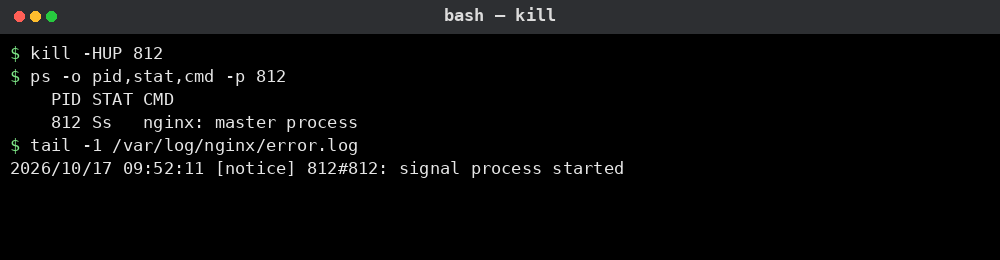
A real production server
---
Source (HTML): https://games.aidebatehub.com/programs/linux/services/kill.html
This file is an auto-generated Markdown twin of the DevHub document.