 AI Knowledge Hub
du — Check disk usage
💬 "du command"
- Concept: An essential Linux command for checking disk usage. It is used to find the culprit folders and files when server storage is full.
- Output structure: The default command prints all sub-items in complex detail in KB units, making it hard to read.
- Recommended practical output: When you type
du -sh *, capacity units are summarized in an easy-to-read format such as45Mor2.3G. - Left column: Shows the total capacity actually occupied by the file or folder.
- Right column: Shows the name of the target using that capacity.
3 Essential Command Combinations
du -sh— Summarize only the total combined capacity of the current folder in a single linedu -sh *— Check the capacity of each item directly under the current folder individuallydu -sh * | sort -h— Sort the output so the largest folders appear at the bottom
💬 "Also tell me one way to apply this"
Scenario: How to resolve a situation where log files explode to GB sizes and the server disk becomes full.
Step 1: Track down the culprit folder
Move to the log directory and sort the folders by size.
cd /var/log && du -sh * | sort -h
Step 2: Target huge files
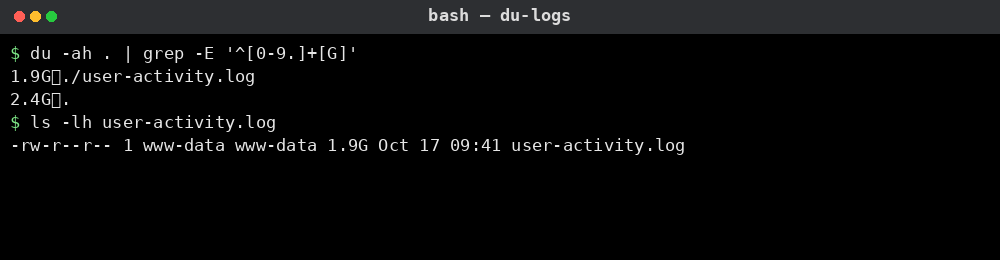
After entering the culprit folder, dig down to the file level and filter out only files larger than 1GB.
du -ah * | grep -E '^[0-9.]+[G]'
Step 3: Free up space safely (key point)
If you delete a running log file with rm, the process keeps holding onto it and the disk space is not returned. Use the command below to truncate the file contents to 0 bytes and reclaim space immediately.
cat /dev/null > user-activity.log
Actual Execution Screen
This is the result of actually creating a folder on this PC and running du -sh * | sort -h. The items get larger toward the bottom, and at the very bottom logs is the largest at 2.3G.
!Result of du -sh * | sort -h: sorted by size from 2.4M src to 2.3G logs
Server in actual operation
This is the result of filtering only files larger than 1GB inside that logs folder. user-activity.log is taking up 1.9G.
Source (HTML): https://games.aidebatehub.com/programs/linux/filesystem/du.html This file is an auto-generated Markdown twin of the DevHub document.
Visitor Comments